Tuesday, April 5, 2011

Americas Rock on Twitter

Twitter Top 100 Users

This Google Map of the Top 100 Twitter users (based on the number of followers) reveals that only 7 of them live outside of the Americas. Those 7, who are all based in Europe, even include Brazilian footballer Kaka and U.S. tennis player Serena Williams.

The markers on the map are colour-coded by category, for example, music, entertainment, technology etc. Like BatchGeo's Map of Top 100 Websites Worldwide the map features a really cool marker clustering system. Not only does each clustered marker show the number of markers at the location it features a nice pie chart that represents the percentage of each website category at the location.

Keep on Running with Google Maps

iFit 

With the iFit you can now run anywhere in the world, virtually, with a little help from Google Maps and Street View.

You can connect iFit Live to an iFit treadmill or exercise bike. You then have the power of Google Maps to create a route anywhere that you fancy running. When you run on your iFit treadmill you can then follow your progress on your route with Google Maps and with Street View, where available.

You can get a good idea of what the experience is like by visiting the iFit demo page. With this demo feature you can draw and view workout maps. You can plan a route and even follow it in Street View.

Wednesday, March 30, 2011

How to Make a Census Map

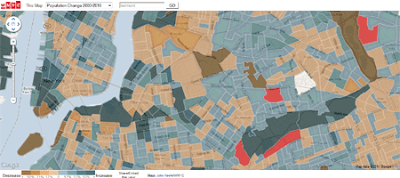
WNYC 2010 Census Map

In my extensive round-up of 2010 census maps yesterday I missed one very good map. WNYC has used Google Fusion Tables to create a great Google Map of the census data for the city of New York.

The map allows you to view heat maps of demographic changes in New York over the last ten years. The map allows you to view population change and changes in race / ethnicity in each of New York's census tracts.

If you are interested in how the map was put together John Keefe has written a great post on Making the WNYC Census Map.

Also See

Data Journalism & the 2010 Census

The Colosseum in Street View

Google have added new Street View imagery in Italy and France. This latest imagery has been captured by the Street View trike that allows Google to go off road and obtain imagery from historical sites, such as inside the Colosseum in Rome.

If you want a quick tour of the Colosseum check out this animated pan of the arena in Street View. 


The Colosseum

Other highlights in Italy include: the birthplace of Rome, the Palatine Hill, theAppian Way, the Thermae (Baths) of Diocletian and the Ponte Vecchio in Florence.

In France you can visit the beautiful château of Fontainebleau.

Via: Google LatLong

Google Maps & Twitter

Twitter Nano

Twitter Nano lets you read real-time Tweets from anywhere in the world. Using the provided Google Map you can zoom in on any location and start reading the latest Tweets posted from there.

As well as dragging and zooming the map you can also use the search box to enter a location. The Tweets for each location appear beneath the map, scrolling down with a nice transition effect.

_____________

RPG with Google Maps

Geo Hunters
GEO Hunters is a free role playing game for the iPhone that uses Google Maps satellite views to create a fantasy world based on your location.

In this game monsters have invaded your neighborhood and you are either a warrior, skilled hunter or crafty wizard. Your goal is to protect your turf by amassing your own monster army. As well as fighting the game's monsters you must also compete against other players to become the top ranking player.

The game is compatible with the iPhone, iPod touch and iPad. 

Monday, March 28, 2011

Your Phone Company is Tracking You

Verräterisches Handy

German Green party politician, Malte Spitz recently got a court order forcing Deutsche Telekom to reveal all the location data it had collected from his mobile phone. German newspaper Zeit has used six months of this data to create a Google Map showing how Spitz' movements were tracked over half a year.

The map animates Spitz' movements over the six months and includes a time-line that lets you check his location on any day and at any time of the day, during the six months. The amount of data collected is amazing (some would say frightening). His location was logged 35,000 times just in that six month period.

The amount of location detail collected by the mobile phone companies means that, for example, we can follow in incredible detail a journey Spitz took on the 31st August 2009 from Berlin to Erlanger.

All privacy issues aside, the Google Map created by Zeit is very impressive. The time-line allows you to visualise Zeit's location on the map for any day and at any time. The animation of the six month's of data includes a speed control, which is useful if you want to animate the whole six months. You can set the animation to play at full-speed and watch as six months of Malte Spitz's life flashes by.

Christchurch Aerial View on Google Maps

Christchurch Post-Earthquake Aerial Photos

The Royal New Zealand Air Force flew a C-130 Hercules at 500 feet over Christchurch two days after the 22nd February earthquake, capturing imagery of the damage suffered by the city. As you can see from the shot of Christchurch Cathedral above the imagery provides an incredibly close aerial view of the city.

Koordinates has created this Google Map that lets you view the aerial imagery on Google Maps. Using Google Maps means that you are able to find locations in Christchurch using the underlying map tiles and zoom in on the new aerial imagery.

Donate to the Christchurch Earthquake Appeal.

Live Mobile Videos on Google Maps

GeoCam.tv

GeoCam.tv is a Google Map of webcams from around the world. The site has recently added live streams from Qik.com. The videos from Qik.com are real-time video streams from users' mobile phones.

What I like about GeoCam.tv is that all the webcams can be viewed directly on the map. Currently the map shows over 1000 webcams from around the world, as well as the live Qik.com feeds. To view a cam just click on a map marker and the webcam image will open in an information window.

Friday, March 25, 2011

What is Trending on Google Maps

Trendero

Trendero is a new Google Maps based application that allows you to report on and follow trends around the world. Users of the application can report local trends and search the world to find what it is popular in other locations.

You can browse the map to search for trends in a number of categories. For example you can search for trends in music, film, books, fashion etc. Trends are assigned a trendiness score based on several factors, including: who reported the trend; how recently the trend was spotted; how actively users are updating the trend and how many people are looking at the trend.